SnipVault 1.1.10 - Manage All Your Sites from One Dashboard
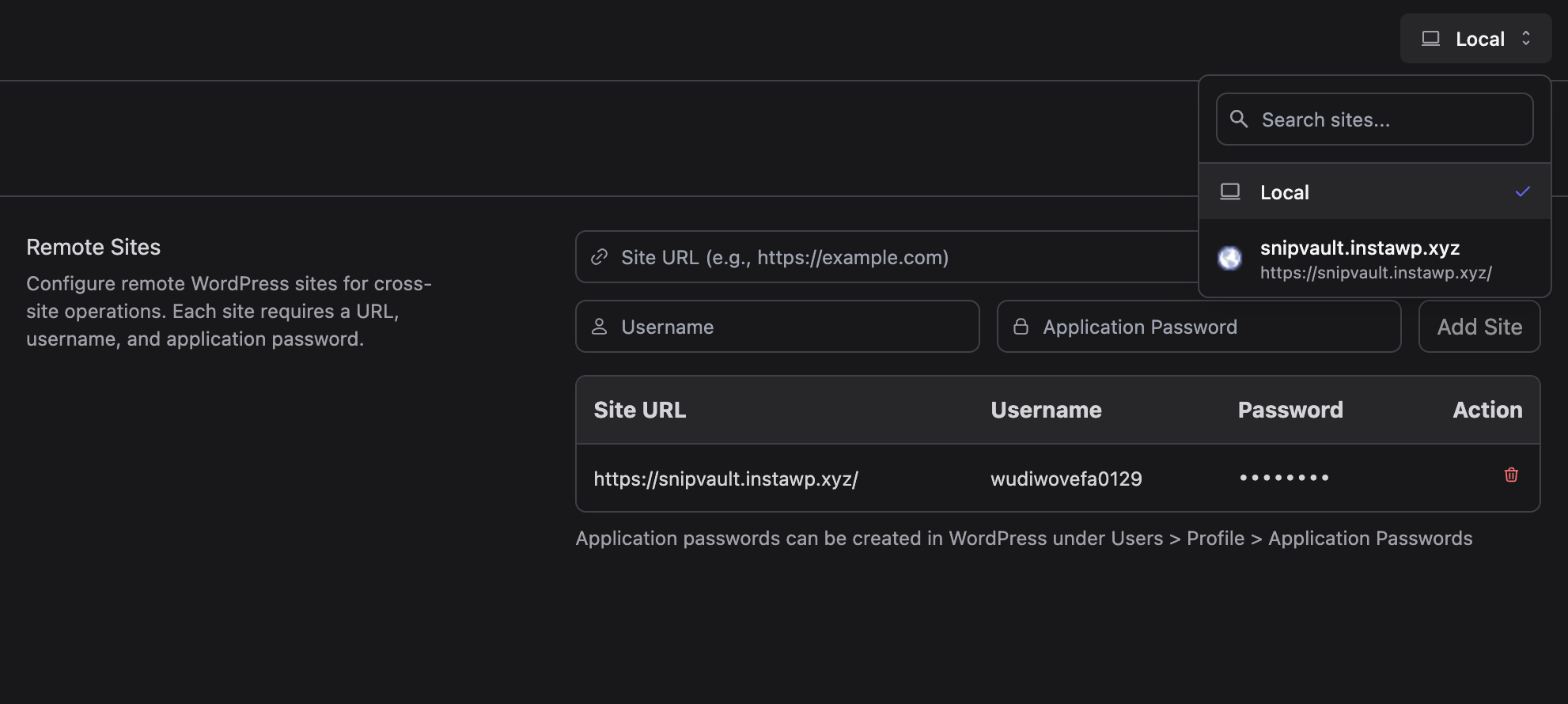
We're thrilled to announce SnipVault 1.1.10, featuring the game-changing Remote Sites capability that transforms SnipVault into a centralised management hub for all your WordPress sites.
Remote Sites: Manage Everything from Anywhere
This is the feature you've been waiting for. SnipVault can now connect to and manage multiple remote WordPress sites from a single dashboard. Install SnipVault on any of your sites, configure your remote connections, and suddenly you have complete control over snippets, error logs, and all SnipVault features across your entire WordPress portfolio.
Here's what this means for you:
Centralized Snippet Management - View, edit, create, and organize snippets across all your sites without logging into each one individually
Unified Error Monitoring - Monitor PHP error logs from all your sites in one place
Cross-Site Operations - Manage settings, folders, and features for any connected site
Instant Site Switching - A sleek dropdown selector with search and site favicons lets you switch between sites instantly
Simply configure your remote sites with a URL and application password in the new Remote Sites settings section, and you're ready to manage your entire WordPress network from wherever you want. Whether you're managing client sites, a network of your own properties, or an agency portfolio, Remote Sites makes multi-site snippet management effortless.
Completely Redesigned Settings
The settings page has been rebuilt from the ground up with organization and usability in mind. A clean left navigation sidebar now organizes settings into logical sections: License, AI & Claude, Security, Features, Editor, PHP Configuration, Remote Sites, and Danger Zone.
Finding what you need is instant thanks to the new search functionality that filters settings sections as you type. It's a modern, intuitive interface that scales beautifully as SnipVault's feature set continues to grow.
Rock-Solid WP-CLI Interface
We've completely refactored the WP-CLI interface for maximum reliability across different hosting environments. The new implementation uses a dedicated REST API endpoint instead of admin-ajax, with comprehensive error handling, timeout protection, and improved path detection.
Key improvements include:
Proper success/failure detection that actually works
Timeout protection for long-running commands (5-minute limit)
Better error messages with debugging information
MySQL client tools detection for database commands
Compatibility fixes for shared hosting with open_basedir restrictions
Graceful handling of disabled PHP functions like putenv()
Reduced memory limits to prevent server overload
Enhanced path detection with fallback to bundled wp-cli.phar
The WP-CLI interface now works reliably on challenging hosting environments like InstaWP and shared hosting providers with strict security configurations.
Improved Snippet Organization
Fixed a race condition that could cause snippets to end up in the wrong folders on slow connections. Snippets now wait for folders to load completely before processing folder assignments, with safeguards to prevent filtering from running prematurely. Your snippet hierarchy now displays correctly every time, regardless of connection speed.
Update now to unlock Remote Sites and transform how you manage snippets across your WordPress portfolio. This is a major milestone for SnipVault, and we can't wait to hear how it streamlines your workflow.