SnipVault 1.2.0.1
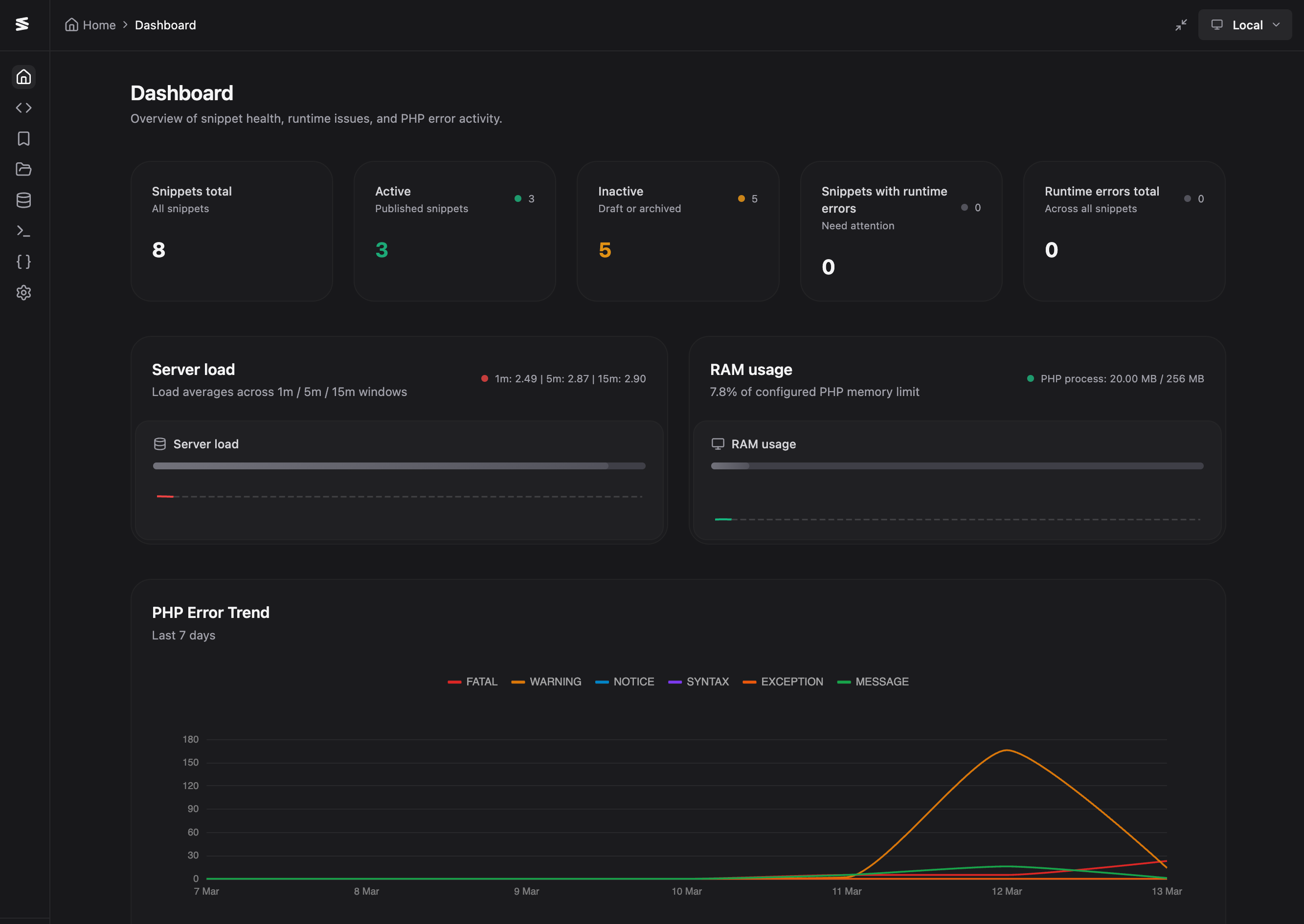
A fast follow-up to 1.2.0 focused on production stability, safety, and a brand new dashboard. This release hardens settings persistence, adds multiple layers of snippet error protection, and delivers a full monitoring home page.
New Dashboard
SnipVault now opens to a dedicated dashboard home page. It surfaces snippet health KPIs — active, inactive, and those with runtime errors — alongside best-effort system telemetry for server load and RAM, each with live sparklines polling every 5 seconds. An ECharts-based PHP error trend chart shows the last 7 days grouped by day, with severity counts in the header row and full light/dark mode support.
A Server Health card shows WordPress version, PHP version, disk usage, SSL status, timezone, PHP memory limit, and a summary of available updates with links to the relevant admin pages. Error log analysis now attributes PHP errors to their source — plugin, theme, WordPress core, or SnipVault — and a dedicated "Errors by Source" card groups them with expandable sections so you can pinpoint what's causing problems at a glance.
Safe Mode & Activation Health Check
Two new safety nets protect your site from broken snippets. On plugin activation, SnipVault now temporarily disables all snippets, runs HTTP requests against both admin and frontend, scans the error log for snippet-origin fatals, and auto-deactivates any problematic snippets with a note explaining why. That note stays visible in the snippet editor until you fix and republish.
Safe Mode can also be triggered manually via an "Activate in Safe Mode" link in the plugins table. When enabled, no snippets execute at all. A toggle in Settings → Features controls it, and a "Deactivate Safe Mode" link appears when it's active. On top of this, the SnippetErrorHandler now catches fatal errors during snippet execution so a broken snippet no longer white-screens your site — it logs the error and continues loading.
PHP Syntax Validation
PHP snippets are now validated via nikic/php-parser before save. Invalid syntax blocks the save and shows a parse error with the exact line number. The format-on-save flow has been updated so that invalid code skips formatting and falls through to backend validation cleanly, rather than throwing a console error.
Settings Stability
This was the biggest area of fixes. Settings reads and writes have been migrated to a dedicated snipvault/v1/settings endpoint, moving away from wp/v2/settings which proved unreliable on production hosts with restrictive core endpoint behaviour. Explicit object cache invalidation has been added after every settings update so Redis/Memcached environments no longer serve stale data.
The hydration flow has been hardened to prevent mount-time race overwrites — immediate child @update saves are blocked until settings are fully loaded. The entire persistence foundation has been stabilised end-to-end: canonical PHP defaults and normalization, aligned REST schema defaults, frontend bootstrap/load/save normalization, defensive array guards to prevent .some()/.length crashes, and shared sanitization across GitHub and settings writers to prevent shape drift after reload.
Individual fixes include: PHP Global Variables now persist on production, the Global Variables section no longer crashes when adding a variable with async settings, settings search no longer crashes when a section lacks keywords, and code editor font size properly validates and persists (8–32px range, default 12).
Snippet Error Logging & Protection
All snippet errors — caught and fatal — are now written to the PHP error log with a [SnipVault Snippet #id] prefix. The Error Log dashboard recognises snippet-origin errors and groups them under "Custom Snippet" with the snippet title. When PHP Global Variables are deleted, removed keys are tracked and defined as null so snippets referencing them don't fatal; re-adding a variable restores it to normal.
GitHub Library Improvements
The Library panel now has a configurable source setting — choose between the built-in SnipVault Library or your connected GitHub repository. When GitHub is selected, repo files are shown inline on a single page with search and bulk import. The click-to-inspect workflow, list item styling, and detail panel match the default Library UI exactly. The GitHub Library inspect view also includes a revision tree so you can browse historical commits and preview a snapshot before importing.
Other Additions
Featured images per snippet — upload from the media library, toggle visibility in the snippets list, click to view full-size
Editor-only frontend live reload — CSS/SCSS updates apply without a full refresh for logged-in admins; PHP/JS/HTML changes trigger an automatic page reload; configurable in Settings → Features
Full screen toggle in the top-right toolbar with state persisted in localStorage
Security Hardening
GitHub OAuth callback now validates and consumes one-time state tokens before exchange, with initiating-user match enforcement
Snippet export downloads use short-lived signed tokens; direct public ZIP access is blocked
The SQL
skip_security_checkbypass path has been removed from the REST API — dangerous query checks are always enforced server-sideLegacy
anthropic_keyis preserved when normalizing provider-based AI settings to avoid key loss on upgradeMedia upload MIME validation now supports wildcard patterns like
image/*
Bug Fixes
Fixed duplicate error notifications when the error log is unavailable — now shows a single friendly notice
Fixed Error Trend chart tooltips being cut off by container overflow
Fixed server load progress bar always reading 100% on Mac/Docker — load average is now scaled by CPU count with robust detection across platforms
Fixed incorrect server load normalization for containerized hosts — now uses 1-minute load with cgroup/cpuset-aware CPU limits and a non-linear scaling curve for shared hosts
Fixed PHP Error Trend chart rendering in Shadow DOM + CSS grid — replaced vue-echarts with direct ECharts init to avoid the 0-dimension fallback
Fixed commit inspection Monaco diff issues from 1.2.0